You are using an unsupported browser. Please update your browser to the latest version on or before July 31, 2020.
close
You are viewing the article in preview mode. It is not live at the moment.
Home > Help Videos > Windows Speech Recognition
Windows Speech Recognition
print icon

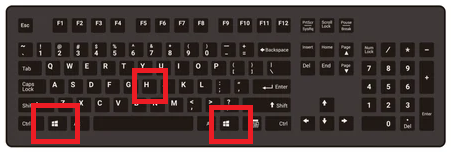
See the attached video, this will show you how to utilize Windows Speech to Text feature when charting encounters. You will pull up the tool bar to begin speaking by holding one of the 'Windows Logo Key' + 'H' on your keyboard.


Feedback
0 out of 0 found this helpful

scroll to top icon