Correcting Trizetto Rejections - Claims Errors on Clearinghouse

If you receive these Rejection reasons on the TriZetto Clearinghouse, please follow the instructions on making corrections in ReLiMed EMR/PM system:
- Contents: - Admission Date is required on inpatient medical visits. 2300.DTP*435
Add in the Admission Date under Edit Claims -> Inpatient tab
- Go to Billing -> Edit Claims, search for the claim, then select the "Inpatient" tab below the grid and enter the Admission Date
- Select the "Claim Details" tab which should then prompt you to save the Claim Override.

Your front desk can also set this date from the Patient Chart -> Patient Info -> Demographics and then the sub-tab "User Defined Fields"
Remember to SAVE on this screen
The Hospital Admit Date and Hospital Discharge Date saved here will be pulled into the Billing -> Edit Claims -> Inpatient tab
ONLY if the Billing Facility selected is a Hospital Place of Service.

- External cause code cannot be used as Principal Diagnosis code. Value of sub-element HI01-02 is incorrect. External cause code cannot be used as Principal Diagnosis code.'
This means you must add/select a new Diagnosis code to be in the primary (1) position.
Go to Billing -> Edit Claims, search for the claim and then select the "Diag PTR" cell for the first line item. You can control all the Diagnosis codes
on the claim through this pop-up, then visit each line item to select which 4 are set as the Diagnosis PTRs for each line item/CPT code.
As a biller if you have the privilege you will be able to use the ADD button to add other diagnosis codes to this claim/line item

- Contents: - You must have a 3rd diagnosis code when diagnosis pointer = 3.
If your Diagnosis PTRs get out of sync or missing/skipping numbers, you can fix by using the NoBill/Rebill button to remove then re-add
They should show sequential as 1, 2, 3... but if they are not as pictured below, select the NoBill button next to each one.
NoBill can be used to remove the code from the claim entirely, then once you select it, the button changed to ReBill
ReBill can be used to add the code back onto the claim and it will fix the sequential ordering

- Contents: 1504741067 - Subscriber ID must be 9 or 11 digits
This is indicating the Subscriber ID is incorrect. This can be fixed right from Billing -> Edit Claims, then select the ellipse button [...]
next to the Payor drop down which will bring up the entire patient insurance screen in a pop-up window:

- Contents: The COB information does not balance.
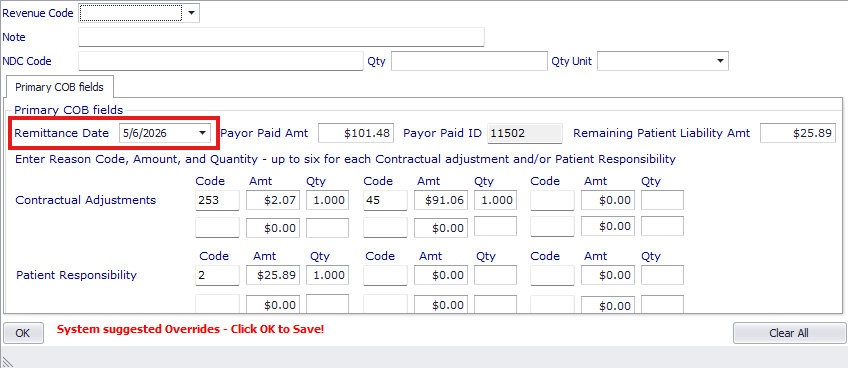
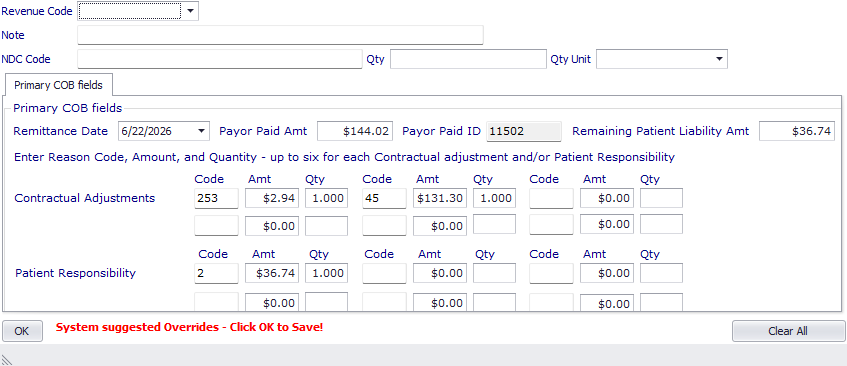
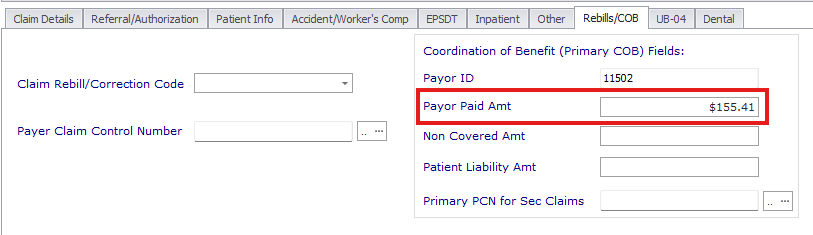
This indicates that the COB information (payments, adjustments, responsibility) in the submitted claim do not match the information in the previous payor's EOB. This can be fixed by going to the Billing -> Edit Claims -> Rebills/COB tab -> Payor Paid Amt (only this field), and Billing -> Edit Claims -> Override (for each line item) and comparing against the EOB for any missing or incorrect information.
- Contents: F -Adjudication Date required either at the claim level or on all service lines for COB and Tertiary claims. 2330 / 2430 DTP*573
This indicates that a remittance date is missing from the claim. You can check this by going to Billing -> Edit Claims -> Status Hx -> View Claim -> Claim Segment Details and searching for the "DTP*573" segments. You can also check and add remittance dates by going to Billing -> Edit Claims -> Override (for each line item) and looking at the Remittance Date field. This date will match the Check Date in the EOB.